
Without doubt AI content can produce output quickly. That’s the easy part. One prompt and you’re away. The real trick that makes it valuable is if the content talks to your customers and clients. In your brand voice.
This is the purpose of the brand voice document; I created it to help your content sound like your business rather than generic, forgettable and at times inaccurate slop.
With this in mind, let’s take a deep dive into the enormous benefits of the brand voice document brings to your business, and why you should develop one for all your business content output.
If you prefer, you can listen to a NotebookLM-generated conversation discussing this content.
The Real Reason AI Content Eats Your Time
Most small business owners discover AI the same way: watch a few YouTube tutorials, open ChatGPT, type in a request, and get… something. It sort of makes sense. It’s vaguely professional. It doesn’t sound like you, however, so you rewrite it. Then rewrite the rewrite. And suddenly you’ve spent more time on a social post than if you’d just written it yourself.
This is what happens when you use AI without a brand voice document.
Basic prompting — “write me an email about my new service” — gives the AI almost nothing to work with. It doesn’t know your tone. It doesn’t know what language you avoid. It doesn’t know whether you’re warm and conversational or sharp and direct. It doesn’t know what you stand for or who your customers are. So it defaults to the blandest possible version of professional content, and you’re left fixing it.
What Happens If You Keep Going Like This
Here’s the honest picture if nothing changes.
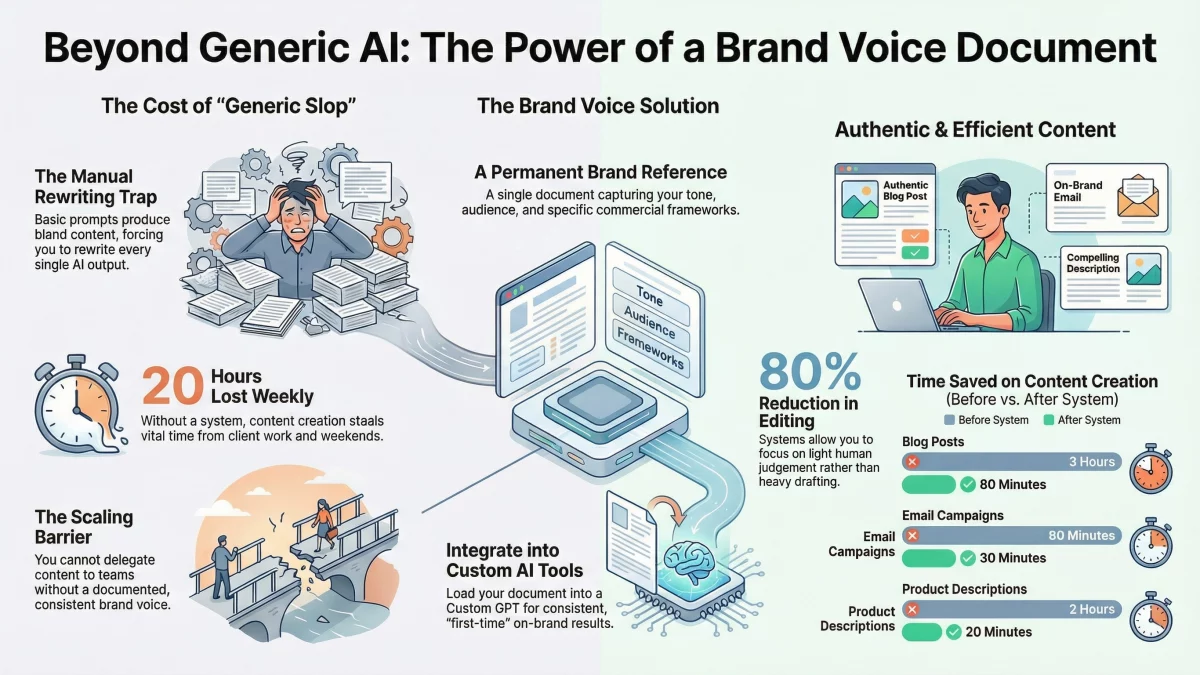
Content creation continues to steal 15-20 hours a week. Those hours come from somewhere — usually evenings, weekends, or time that should be going to client work. The output stays inconsistent because every time you sit down to write, you’re starting from scratch, either with a blank page or a generic AI output that needs heavy editing.
Scaling becomes genuinely difficult. You can’t hand content off to a team member because there’s nothing written down about how your business sounds. You can’t use AI reliably because every session produces something different. And the longer this continues, the harder it gets to carve out time to fix it.
The people who try to solve this by working harder — earlier mornings, later nights, weekends — hit a wall eventually. Burnout isn’t a productivity problem. It’s a systems problem.
The other common approach is persona-based prompting: writing out a character description at the start of every AI session to try to steer the output. This can help, but it’s inconsistent, and it still requires you to rebuild context every single time you open a new chat. It’s a workaround, not a solution.
A Better Way to Work to Produce AI Content
The fix isn’t a better prompt. It’s a brand voice document — a single, permanent reference that tells your AI exactly how your business communicates. This document is designed to produce all your AI content.
A proper brand voice document covers:
- Who you are and what you do — your positioning, your core message, your market
- Who your customers are — their situation, what they want, what they’re afraid of, what language they use
- The problems you solve — specifically, not generically
- Your tone and style — what you always include, what you never say, your signature phrases and your banned phrases
- A framework for commercial content — in our case, the Benefits Ladder, which ensures every piece of content reaches the emotional outcome your customer actually cares about, not just a list of features. This is built-in to the brand voice document
Once this document exists and lives permanently inside a Custom GPT or Claude Project, everything changes. You’re not rebuilding context every session. You’re not hoping the AI guesses your voice correctly. You open your AI tool, fill in a simple template with the specifics of what you need, and get content back that sounds like your business — first time, every time.
That’s the difference between saving 20 minutes here and there and genuinely reclaiming 10-15 hours a week.
How to Get Started
The brand voice document is where every properly configured AI content system begins. To help you build yours, we’ve created a free downloadable template that takes you through all the key sections: your positioning, your audience, your tone and style rules, your language guidelines, and the commercial framework that makes AI content actually convert.
Download the free Brand Voice Document template at:
powercopy.co.uk/downloads-brand-voice-document
Frequently Asked Questions
Why does AI-generated content sound generic?
AI produces generic content when it has no brand context to work from. A basic prompt like “write a social post about my service” gives the model nothing specific — no tone, no positioning, no language rules. It defaults to a bland middle ground that could apply to any business. The fix is loading your brand voice into the AI permanently via a Custom GPT or Claude Project, so every output starts from your specific voice rather than a blank slate.
What is a brand voice document for AI?
A brand voice document is a written reference that captures how your business communicates — your tone, your target audience, the problems you solve, the language you use and avoid, and the commercial framework you follow (such as leading with customer outcomes rather than product features). When this document lives permanently inside a Custom GPT or Claude Project, the AI applies it to every piece of content without you having to explain your brand each time.
How much time can AI save on AI content creation?
With a properly configured system — brand voice document loaded into a Custom GPT or Claude Project, combined with fill-in-the-blank templates for your most common content types — most small business owners save 10-15 hours per week. Specific tasks that typically improve: product descriptions drop from around 2 hours to 20 minutes, email campaigns from 90 minutes to 30 minutes, and blog posts from 3 hours to around 60 minutes.
What is the difference between AI prompts and AI templates?
A prompt is a one-off instruction you type each time you need content — it requires you to rebuild context every session and produces inconsistent results. A template is a simple fill-in-the-blank structure (content purpose or goal, key features, objections, call to action etc) that you pair with a Custom GPT already loaded with your brand voice. You fill in the variables, paste them in, and get consistent content in your voice — without copying lengthy instructions every time.
Do I need technical skills to use a Custom GPT or Claude Project?
No. If you can use Google Docs, you can use a Custom GPT or Claude Project. The setup — creating the tool and loading your brand voice document — is done once, either by yourself or in a session with a consultant. After that, the process is: open your Custom GPT, fill in a template, paste it in, get content. There’s no coding, no complex configuration, and nothing to maintain.
Why does AI content still need editing even with a brand voice document?
A well-configured AI system should reduce editing significantly — but you’ll still review output for accuracy, context, and final judgement calls. Expect to make light edits on around 20% of outputs. This is normal and healthy: the AI handles the heavy lifting of drafting, you apply the human judgement that keeps content accurate and authentic. The goal is to cut your content time by 70-80%, not to remove your involvement entirely.
How do I stop AI from making my content sound like everyone else?
The root cause of homogeneous AI content is homogeneous input — everyone using the same generic prompts gets the same generic output. The solution is specificity: a brand voice document that captures your precise tone, your banned phrases, your signature language, and a commercial framework (like the Benefits Ladder) that pushes content toward the outcomes your specific customers care about. The more specific your brand voice document, the more distinctive your output.